Botanical No. 3 Life is better with coffee Menu Espresso$3 Latte$5 Cappuccino$5 Mocha$6 Cold Brew$6 Matcha$6 SINGLE DOUBLE Breville Welcome to Himali's Portfolio Brew a cup to get started it becomes your cursor touch to order ↓ Skip coffee — go straight to portfolio
☕ The Brew Bar
craft your perfect cup
Choose your drink
Espresso
Latte
Cappuccino
Mocha
Matcha
Cold Brew
Size
Small
Regular
Large
Shots
Single
Double
Triple
Milk
Whole
Oat
Almond
None
Syrup
Vanilla
Caramel
Hazelnut
Name on the cup
Grinding fresh beans…
Your espresso is ready!
single · whole milk
Product Design 2026 Mobile + Web

UFCU: Find a Branch or ATM

A location-finding experience for 400,000+ credit union members, shipped across mobile and web.

My role
Product Designer
End-to-end ownership
Platform
Mobile + Web
iOS · Android · Browser
Collaborators
PM + Engineers
Cross-functional team
Members served
400,000+
UFCU credit union members
UFCU web view UFCU mobile view

Finding a branch shouldn't be hard

Finding your nearest UFCU branch or ATM should take seconds. For most members, it didn't. The existing experience was fragmented, redirected users out of the app, and wasn't built for how members actually use their phones in the moment.

End-to-end design ownership

I led design end-to-end: discovery, information architecture, interaction design, and handoff. I worked alongside a product manager and engineering team and was responsible for every design decision from the first wireframe to the shipped product.

01
Filter by branch or ATM, so members could instantly narrow results to exactly what they needed, without scrolling through irrelevant locations
02
Book an appointment directly from the branch detail screen, so members could go from "I need help" to "I have a slot" without leaving the app
03
Adapted the full experience for web in parallel, keeping the IA consistent while respecting platform differences
04
Shipped on iOS, Android, and web, fully native, no redirects, no friction

Full case study available on request

Get in touch
Next case study
Verizon: In-Store Business Experience
HopeHaven 6 Weeks UX Design UX Research Mobile App

A platform for women to heal together after miscarriage

Miscarriage affects 1 in 5 pregnancies, yet women face it in silence. HopeHaven is a personalised matching app connecting women through shared experiences, fostering empathy, community, and healing.

My role
UX Designer & Researcher
End-to-end process
Team
4 teammates
Team Laniakea
Duration
6 weeks
Full design cycle
SUS Score
86.25
Above benchmark of 68
HopeHaven screen HopeHaven onboarding HopeHaven matches
My contributions

What I did

01
Analysed qualitative and quantitative research data
02
Created wireframes and interactive prototypes
03
Defined user persona and user journey
04
Conducted usability testing to identify issues

Projected impact

80%
Reduction in user confusion through improved UX writing
81
NPS score, showing high usability
40%
Reduction in time-on-task through better navigation
The problem

Miscarriage is a silent battle

Miscarriage leaves a profound impact emotionally and physically. Our mission was to shatter the silence surrounding this often-overlooked experience, providing support and bringing to light the hidden aftermath faced by countless women.

1 in 5
pregnancies end in miscarriage
23M
miscarriages take place each year worldwide
44/min
couples lose their child every minute

Why this matters

43.9%
of women who miscarry will show signs of post-traumatic stress disorder
11.4%
of mothers considered suicide, and 1.8% attempted it
1.4%
of parents divorced because of the miscarriage
Research · Interviews

Talking to the people who lived it

5
Interviews: 3 with women who experienced miscarriage, 2 with their partners
50+
Research papers read as part of our secondary literature review

What they told us

"If someone had told me what to expect and walked me through what would happen and the decisions that I would have to make, I could have made better ones. I didn't know, so I have to live with the regrets of flushing my first born baby down the toilet. She didn't get a proper burial."

Kristin

"When I shared the news with my mother-in-law, there was no follow-up or check-ins. No one inquired about how I was coping or feeling. It wasn't that I felt ashamed, but I certainly felt the weight of going through it alone."

Rebecca

Takeaways

Lack of knowledge
Many women lack knowledge about the miscarriage process, leading to confusion, isolation, and distress.
Partners need guidance too
Partners were unsure how to offer support. They grieve too, but don't know how to navigate their emotions.
Every experience is different
Miscarriage is deeply personal, shaped by partner, family, medical care, and personal history.
Research · Secondary

What the literature told us

We read 50+ research papers. Key findings:

Psychological impact
Miscarriage can lead to anxiety, depression, and even PTSD.
Lack of acknowledgment
Miscarriage is not given the same level of support as other types of loss, leading to feelings of isolation.
Relationship challenges
Couples struggle to understand and support each other through the grief.
Research · Competitive analysis

What already exists and why it falls short

We researched 13 existing solutions. We only found: support group websites, grief handling applications, and pregnancy-after-miscarriage apps. None were specifically built for women going through miscarriage.

Generic support groups
Existing websites overlook the fact that every woman's experience is unique. A generic group fails to cater to individual differences.
Limited availability
Many support sites lack 24/7 assistance, a significant challenge for women in crisis at any hour.
Wrong focus
Existing apps are primarily pregnancy tracking tools, not support tools for miscarriage.
The gap
There are no apps specifically for women who have suffered miscarriage. This motivated us to build something that helps them feel less alone.
Pregnancy after loss
Good grief
Where research led us

Two areas of focus

01
Empowering women to combat PTSD and seek closure
Research shows women often experience silent grief, highlighting the need for closure after miscarriage.
02
Support groups and educational resources
Many women feel uninformed post-miscarriage. A support system of those with similar experiences can offer insight and connection.
User persona

Who we designed for

User persona

"How might we create a platform where women can share their unique experiences and connect with others who have faced similar challenges, fostering hope and a shared sense of understanding?"

Solution

A personalised matching app

We conducted 3 brainstorming sessions which generated 76 ideas. Keeping our users' needs and goals in mind, we finalised our solution.

Brainstorming

Our final brainstorming session, the one where we found our solution

A personalised matching application that connects women who have recently experienced miscarriage and are seeking support, with those who experienced one some time ago, fostering empathy and contributing to the healing journey.

Validated by a medical professional

Dr. Jana L. Seitz

"This app idea could be very powerful. It is my job as a medical professional to give patients what they need from a medical perspective. But there are mental and emotional health concerns too. This app has the potential to address the unique needs of women."

Dr. Jana L. Seitz
Design process

From journey to prototype

User journey

User journey

A woman learns of her miscarriage, tries to connect with others, finds their experiences too different, then discovers HopeHaven

Sketches

Sketch 1
Sketch 2

Low-fidelity wireframes

Wireframe 1
Wireframe 2
Wireframe 3
Wireframe 4

Wireframe iteration

We updated the matches screen to fit more information, adding occupation and interests. We replaced the generic progress bar with a category-specific one and removed the redundant profile section.

Before
Before
Original matches layout
After
After
Added "Get matches" button, category progress
Final design

The app in detail

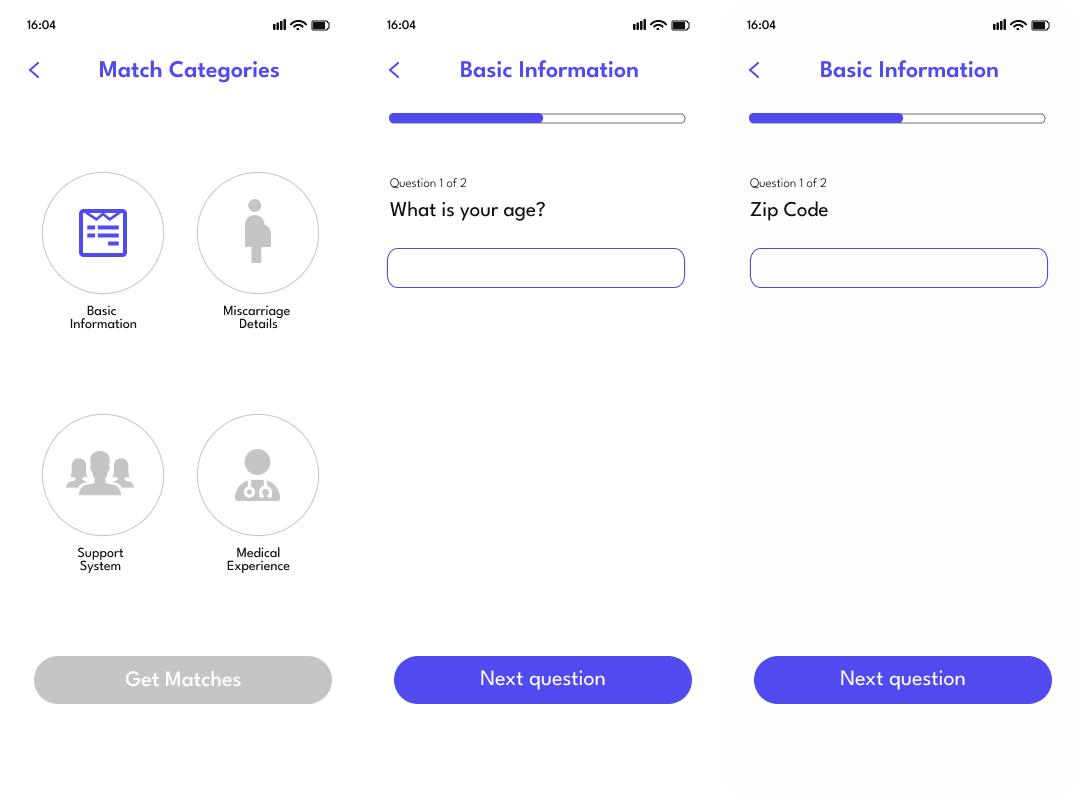
Basic information
Asks for age and zip code so the user is matched with someone of similar age and in a nearby location.
Basic info flow
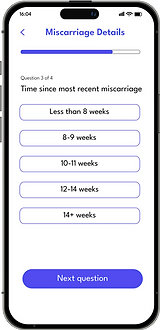
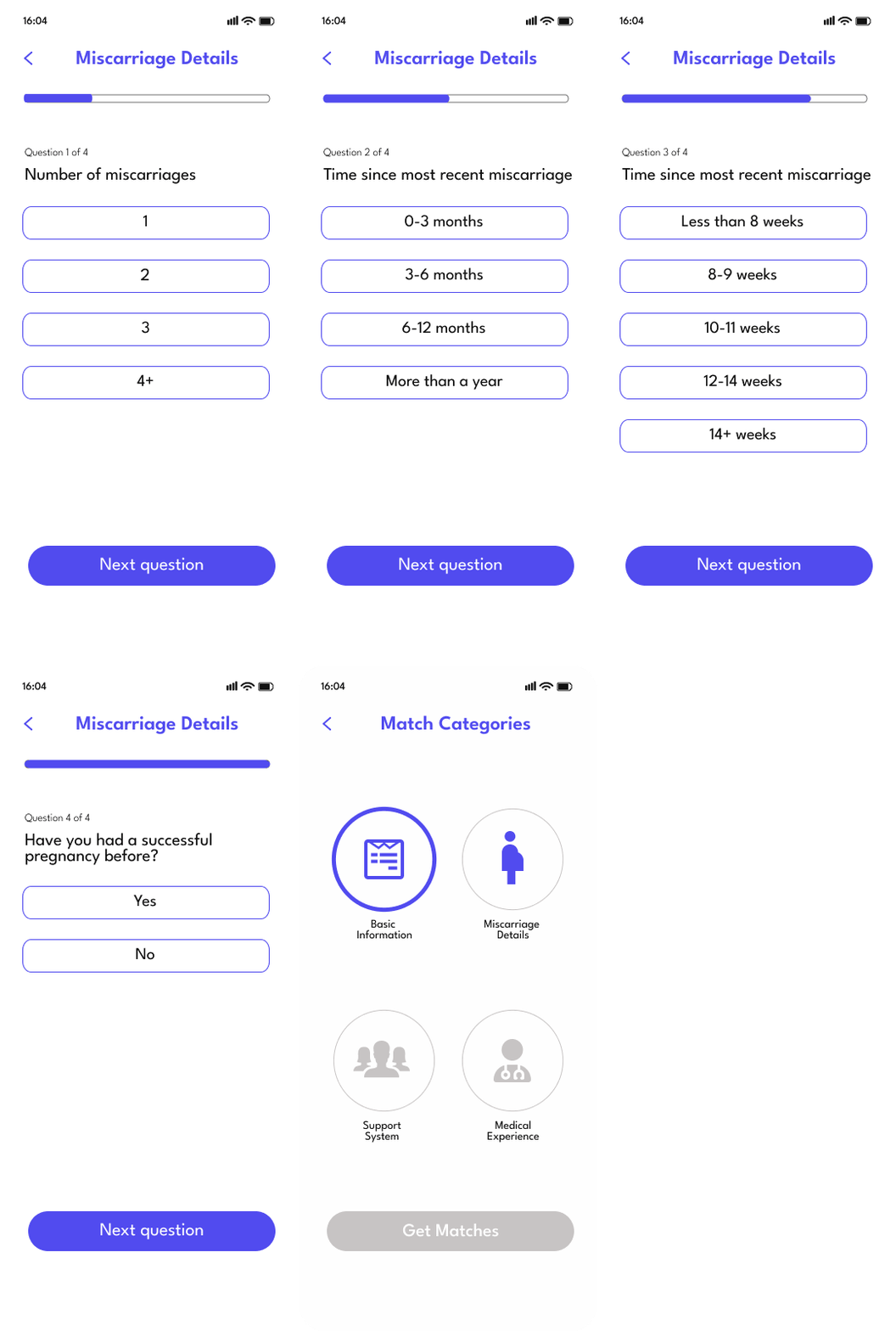
Miscarriage details
The most important category: these questions ensure each user is matched with someone who has had a genuinely similar experience.
Miscarriage details
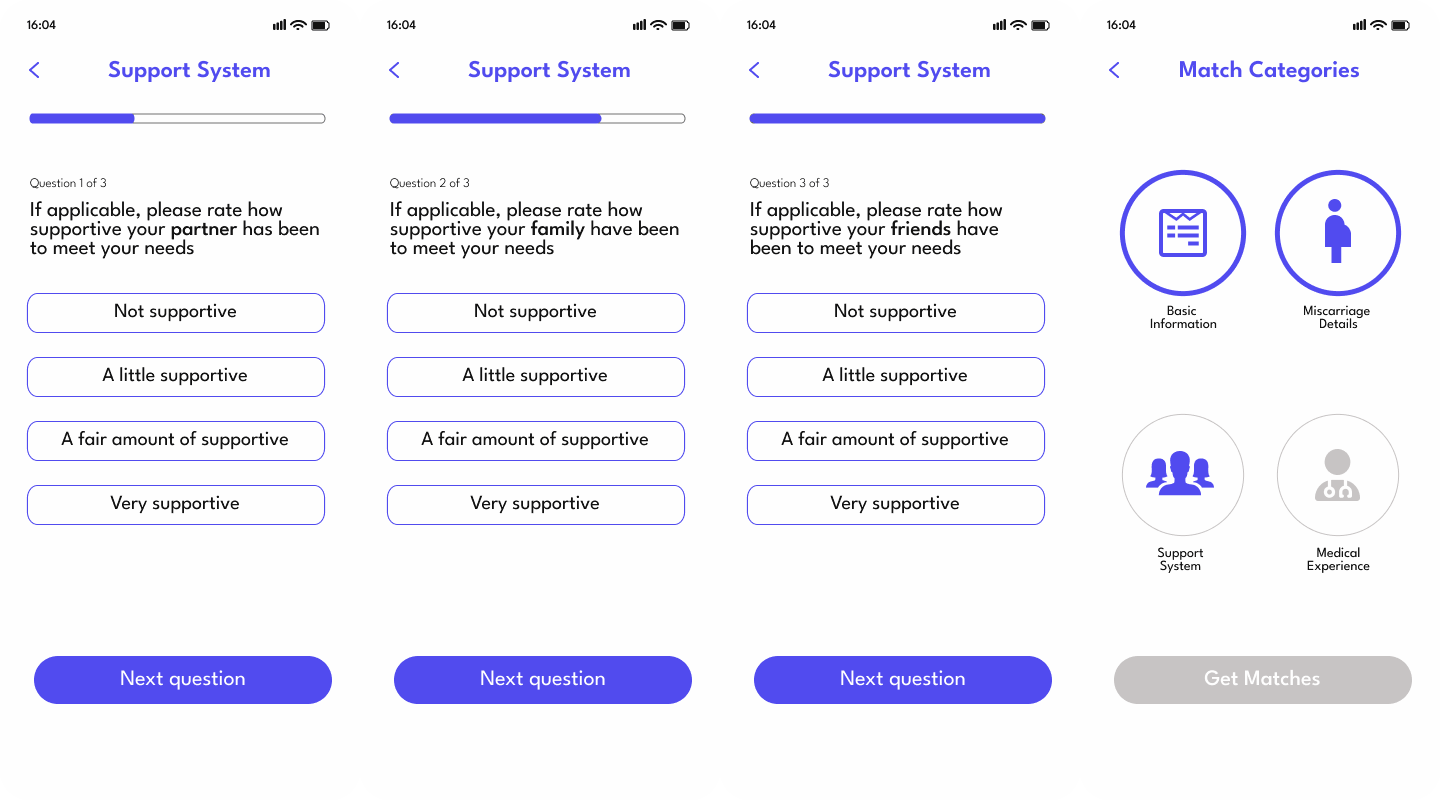
Support system
Research found support systems were critical in recovery. This section asks how supportive the user's partner, friends, and family have been.
Support system
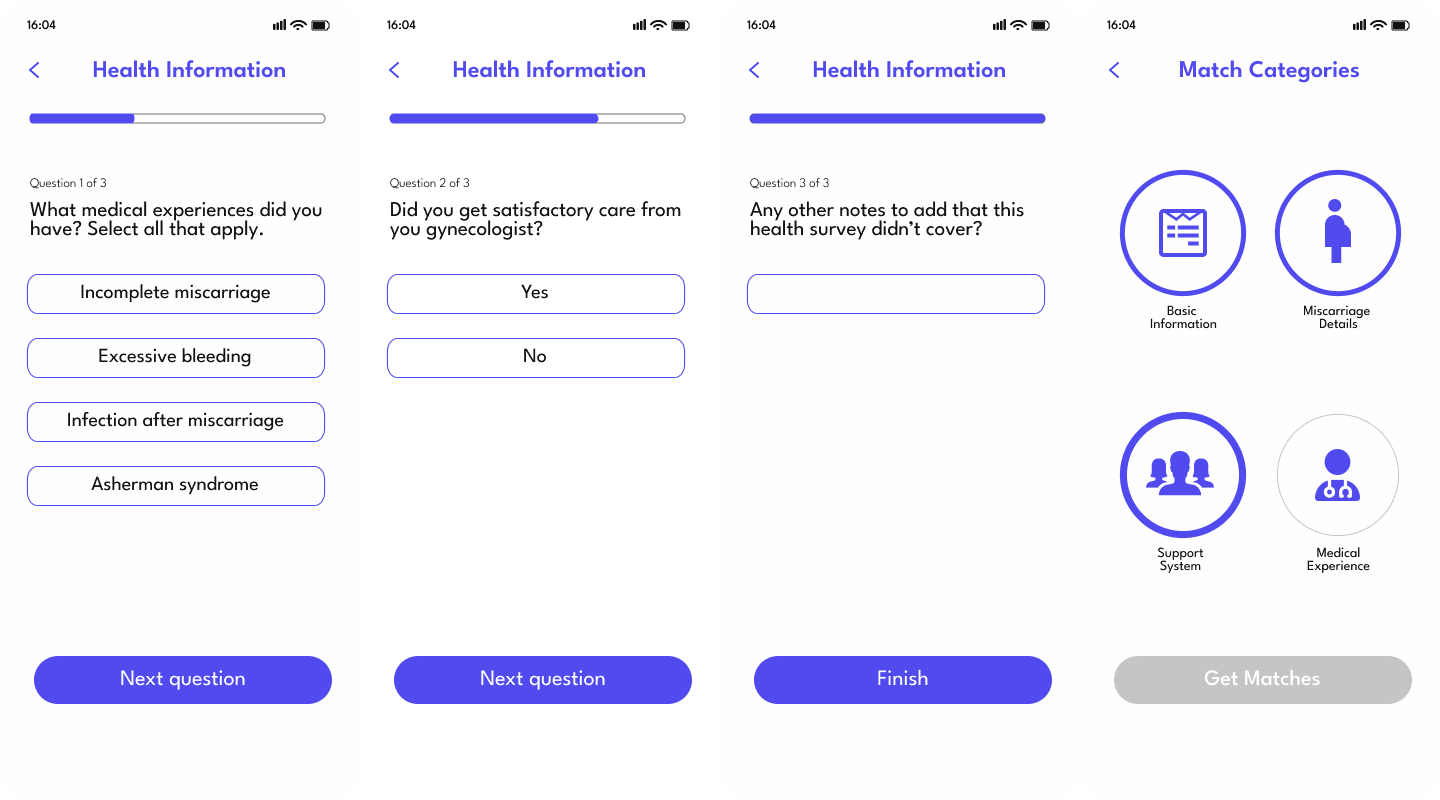
Health information
Medical experience is a key differentiating factor. Users were often disappointed with how they were treated medically; this section captures that.
Health info

Final screens

Sign up
Sign up
Onboarding
Onboarding
Matches
Matches
Messaging
Messaging
Profile
User profile
Evaluation

How we tested and improved

🧠
Heuristic evaluation
Expert review against Nielsen's 10 usability heuristics
💬
Think-aloud sessions
3 sessions with potential users narrating their experience in real time
📊
SUS questionnaire
Post-task System Usability Scale survey after expert evaluations

Iteration 1: UX writing for "gestational age"

Users were confused by the medical term. We replaced it with plain language everyone understands.

Before
Before
"Gestational age" caused confusion
After
After
Plain language replacement

Iteration 2: Block, mute, and report features

User testing revealed not all connections are ideal. We added block, mute, and report features to keep the space safe.

Block mute report

SUS results

86.25
Average SUS score
Benchmark: 68. HopeHaven exceeds it with minimal usability issues
SUS chart
Future work

Where we go from here

Include the partners of women who have had a miscarriage as users on the app
Expand safety, security, and confidentiality of users' data
Include therapists and gynaecologists as users on the app
My learnings

What this project taught me

Research is key
It is so important to learn and understand the problem from the users' point of view, and this can only be done through research. User research provides insights into needs, behaviours, and pain points that guide design toward solutions that resonate with real people.
Feedback expands your horizons
I knew I didn't know everything. Fighting the urge to create solutions from my own assumptions, and actively seeking opinions different from my own, helped me build something much better than I could have alone.
Behind the scenes

Meet Team Laniakea

Team Laniakea
Team Laniakea!
Research session
After completing a research session at the women's hospital
Tools & skills
FigmaFigJamGoogle FormsUser InterviewsCompetitive AnalysisHeuristic EvaluationThink-Aloud TestingSUSWireframingPrototyping
Verizon Oct 2024 – May 2025 UX Design UX Research iPad

Transforming Verizon's in-store experience for business customers

Sales reps were missing huge opportunities because they only knew phones and internet. We designed an iPad tool that helps them surface every relevant Verizon solution — and cut customer in-store time from 52 minutes to 10.

My role
UX Designer & Researcher
End-to-end design process
Platform
iPad
In-store sales tool
Team
+ Stakeholders
Close collaboration throughout
NPS Score
72
After usability testing
Verizon iPad solution mockup

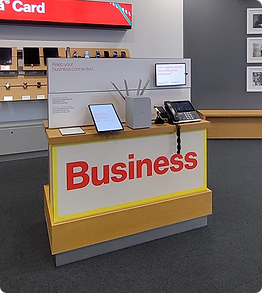
Verizon offers so much more than phones and internet

Fleet management. Cybersecurity. Cloud storage. Mobile device management. Business productivity tools. Verizon's business portfolio is enormous — but most small business customers walking into a store have no idea. And neither, effectively, do the sales reps serving them.

When customers walk in, reps default to phones and internet — the products they know. Everything else goes unmentioned. That means missed sales opportunities for Verizon, and unmet needs for business customers who could genuinely benefit from more.

How might we help Verizon sales reps effectively recommend relevant solutions for small business customers, based on their unique needs and goals?

01
Increase Verizon's business sales by uncovering and meeting more customer needs
02
Reduce customer in-store time by streamlining the discovery and solution process
03
Boost cross-selling opportunities by introducing relevant services beyond phones and internet
04
Empower frontline sales reps with the knowledge and tools to handle business customers confidently

Understanding the gaps in the current discovery process

To uncover challenges in how Verizon serves its business customers, we conducted interviews with store sales representatives, business representatives, and account managers.

22
Interviews conducted with sales reps, business reps, and account managers

Key insights from interviews

01
Retail reps often only suggest network solutions — internet and phones.
02
Business sales reps reach out to MSAs (Master Solution Architects) for solutions above network level.
03
On average, it takes 52 minutes for a business customer to walk out of the store with a solution.
04
Retail sales reps are not equipped to handle a business customer's full range of needs.

What's stopping reps from selling beyond phones and internet?

Root causes
Low Confidence & Fear of Error
Lack of Product Knowledge
What reps said
I'm just nervous to sell anything beyond internet and phones.
I don't feel confident explaining complex business solutions.
There are too many products, and it's hard to keep up.
How do I know which product is the right fit for them?

Understanding the "why" behind sales reps not suggesting other solutions was the most important part — it revealed underlying knowledge gaps, confidence issues, and structural barriers.

Seeing the gaps firsthand

To see the gaps firsthand, we observed how business customers were handled in real time, from the first greeting to the final handoff.

06
In-store observation sessions conducted
Observation session 1
Observation session 2
01
Reps mostly sold phones and internet — rarely suggested full business solutions.
02
For complex needs, reps submitted leads to MSAs — causing delays and drop-offs.
03
Many customers didn't know Verizon offered tools like Google Workspace or fleet management.
04
Reps used iPads with tools like Artemis and Salesforce for lead generation and note-taking.

Making sense of the data

We used affinity mapping to organise insights from interviews and observations. By grouping similar quotes and behaviours, we uncovered key themes around sales rep hesitation, knowledge gaps, and missed opportunities in customer engagement.

Affinity mapping

Affinity mapping helped us make sense of a large volume of qualitative data by clustering similar insights together. It allowed us to spot recurring patterns across interviews and observations, revealing the root causes behind sales rep hesitation and gaps in the current discovery process.

Why iPad?

We were initially torn between designing our solution for a kiosk or an iPad. Both had their pros and cons, so we turned to the people who would use it most — the sales reps. Their feedback was clear and unanimous: they preferred the iPad. It fit seamlessly into their existing workflow and felt natural in conversation with customers.

iPad option
iPad — preferred by sales reps
Kiosk option
Kiosk — considered but rejected

An iPad tool that listens and recommends

An iPad-based tool that helps sales representatives capture customer needs during in-store conversations and instantly generates personalised product recommendations tailored to each business customer's unique situation.

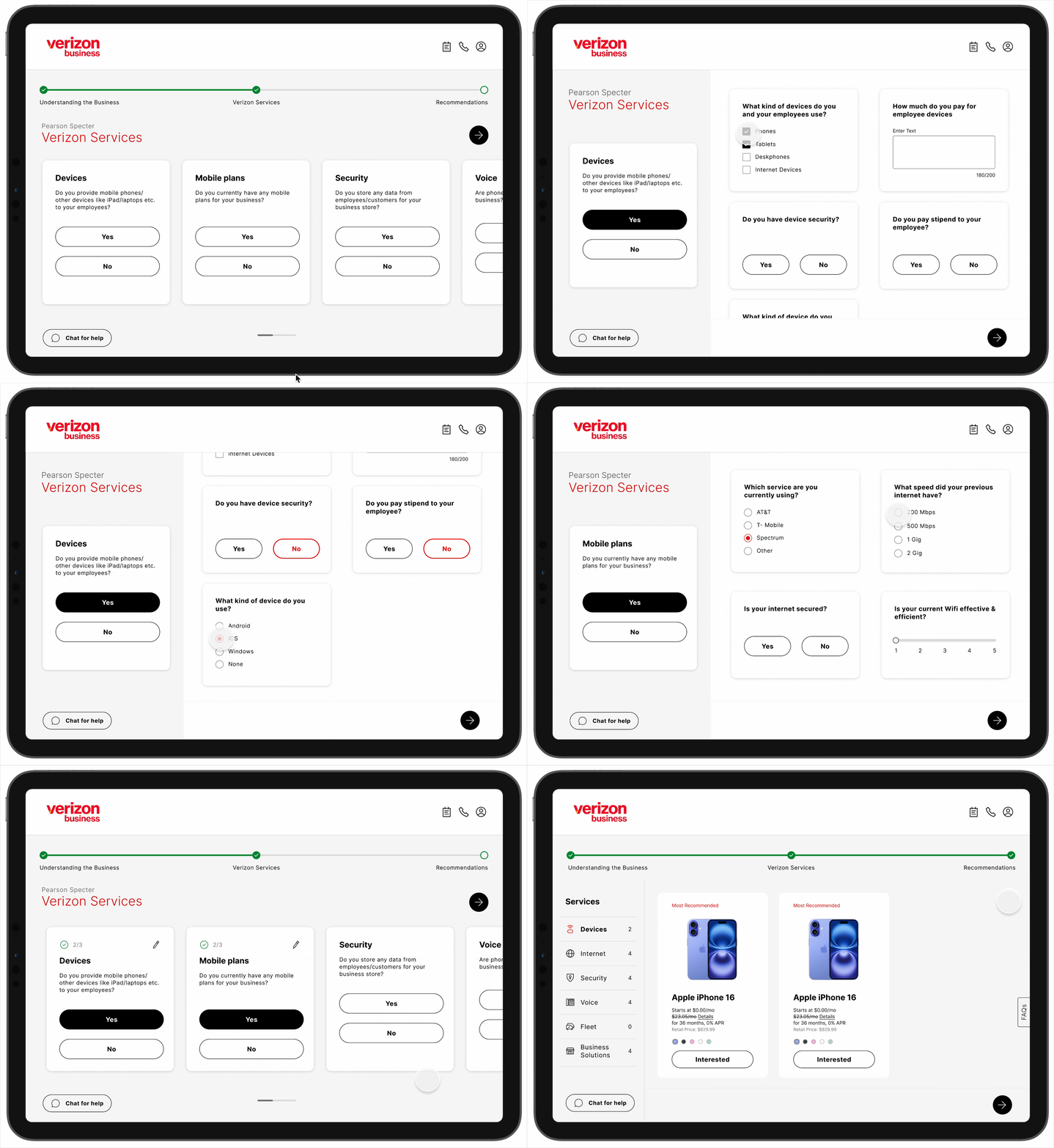
Current in-store flow

Business customer walks in
Rep only suggests phones & internet. Others referred to business rep
Business rep refers to MSA for complex solutions
MSA handles all customer needs
Customer makes a purchase

Proposed flow with iPad solution

Business customer walks in
Rep is equipped to handle all needs using the iPad solution
Customer makes a purchase

From architecture to prototype

We kicked things off by mapping out the information architecture to get a clear structure in place. Then moved to paper sketches to quickly explore ideas and get everyone aligned before committing to pixels.

Information architecture

Information architecture

Paper sketches

Keeping things low-fi helped us iterate quickly and gather early feedback without getting caught up in details.

Services low-fi
Notes low-fi
Services follow-up low-fi
Call low-fi

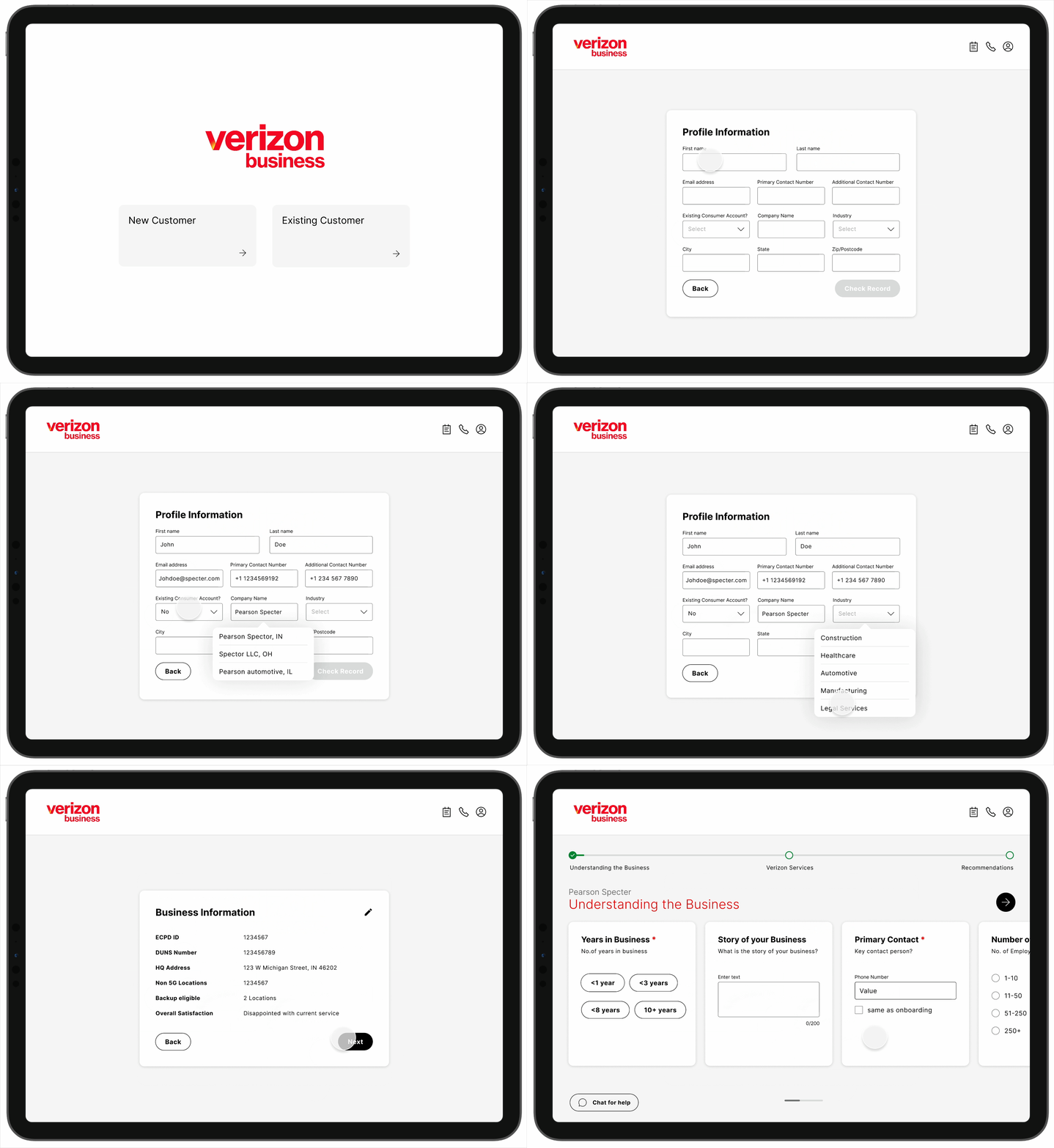
The solution in action

Onboarding flow
Pulls data from existing tools and auto-populates information — saving time and reducing manual effort from the start
Onboarding flow
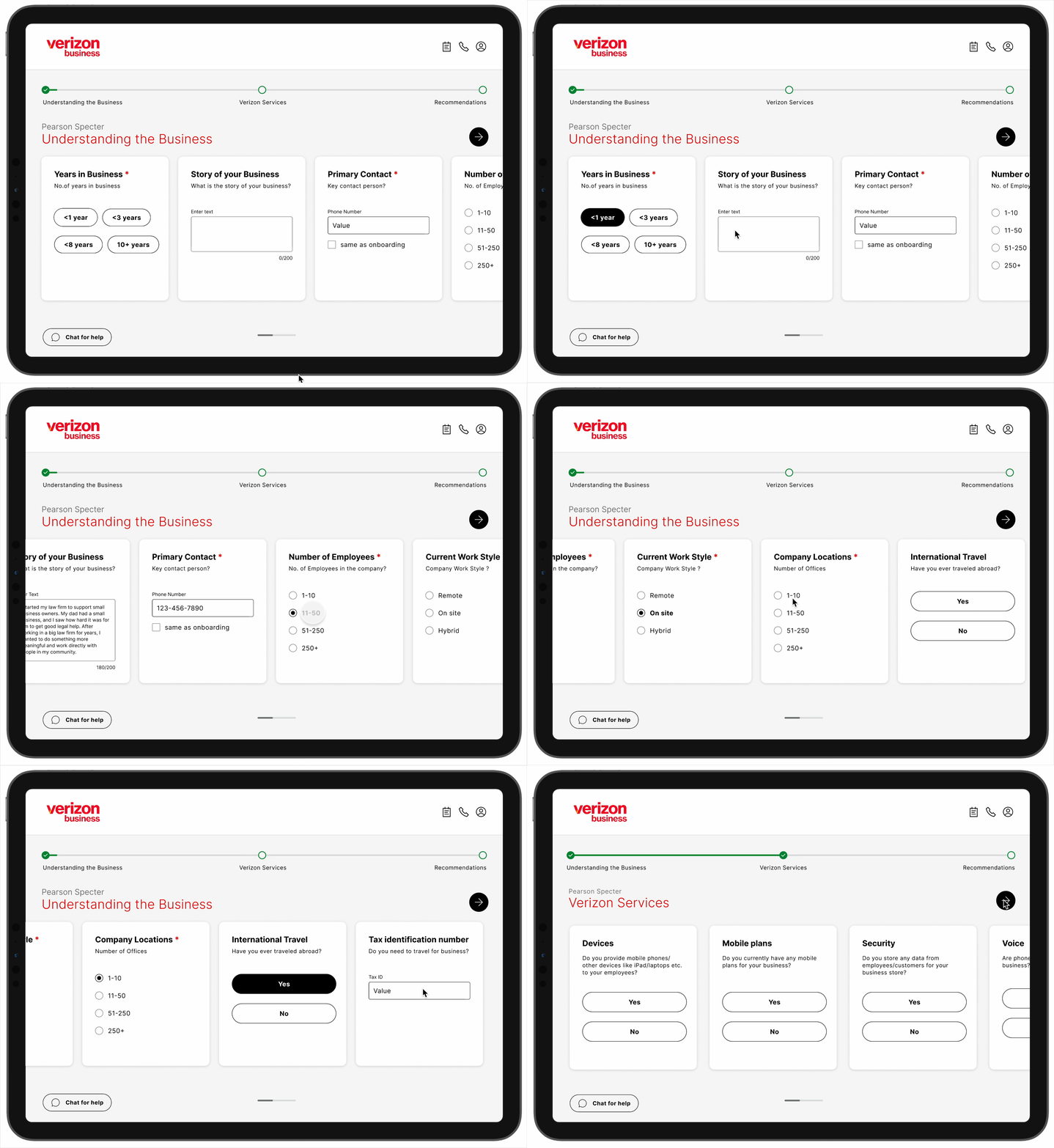
Understanding the business flow
Collects data about the customer's business to generate personalised recommendations
Business understanding flow
Services flow
Collects data on what services the customer currently uses
Services flow
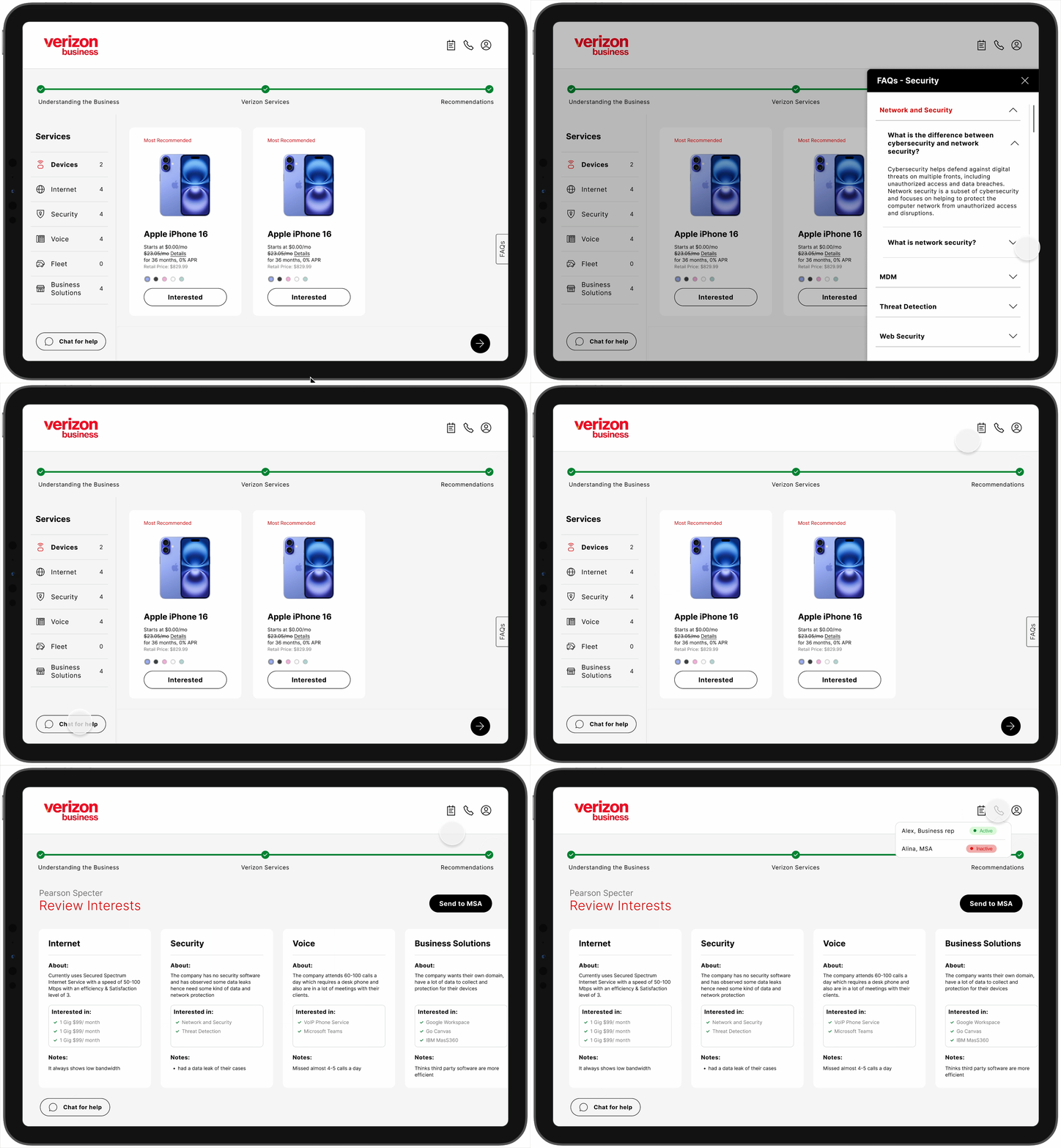
Recommendations flow
Provides personalised recommendations based on collected data. Reps can review and send directly to MSA — saving significant handoff time
Recommendations flow
Additional features
FAQs for quick lookup, Verizon GPT chat for on-the-spot questions, notes, and direct call to MSA or business rep
Additional features

Testing with real users

To assess effectiveness and usability, we conducted both concept testing with Verizon stakeholders and usability testing with the people who would actually use it day-to-day.

02
Concept testing sessions
with Verizon stakeholders
11
Usability testing sessions
with sales and business reps
Usability testing session 1
Usability testing session 2
What users loved ✓
  • Ease of use — accessible even for new reps
  • Clear product recommendations for faster decisions
  • Support for cross-selling beyond phones and internet
  • Send to MSA option reducing handoff delays
  • FAQ section for quick customer questions
What could improve
  • Replace generic labels with Verizon-specific terminology
  • Opportunity to incorporate Verizon's in-house AI for dynamic personalisation

What we changed based on testing

Button placement for follow-up questions

During testing, users had trouble finding the Next button on the left side — it caused confusion and slowed them down. Moving it to the right, where people naturally expect it, made the flow immediately smoother.

Before
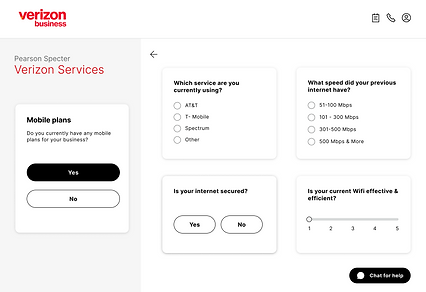
Before — button on left
After
After — button on right

UX copy refinement

We refined the UX copy to better align with Verizon's internal language. Generic terms like "Internet" and "Marketplace" created confusion — replacing them with Verizon-specific terminology reduced hesitation and improved trust.

Before
Before — generic copy
After
After — Verizon-specific copy

The reception

Users loved the solution — it was well received across every rep we tested with.

"This system is way better than what we currently have — it's more intuitive and much easier to use."
Sales Rep
"Using this product, I can keep the conversation with customers completely natural — it doesn't feel forced at all."
Business Rep

Measurable outcomes

10 min
In-store time — down from 52 minutes
72
NPS score received from usability testing
35%
Projected increase in Verizon Business sales
Boosted product awareness for both reps and customers

Keeping it human

One key challenge was preserving the natural conversation between the sales rep and the customer. We didn't want the iPad interface to feel robotic or disrupt the personal connection that makes a good in-store experience.

To keep the flow human and flexible, we designed the experience so reps could jump between suggested questions rather than follow a rigid script. Not all questions were mandatory. Usability testing confirmed that this approach maintained a natural, conversational tone during interactions.

UX Research User Interviews Usability Testing Affinity Mapping Information Architecture iPad Design Figma Prototyping
View prototype in Figma
Next case study
HopeHaven: Healing after miscarriage
Figma Plugin Claude AI Internal Tool

Branch Visit Notes Generator

A Figma plugin I built in 2 days that turns handwritten branch visit notes into sorted, color-coded sticky notes using Claude AI. What used to take the team half a day now takes one click.

My role
Solo builder
Design + development
Built in
2 days
From idea to shipped
Time saved
4+ hours
Per person, per cycle
Powered by
Claude AI
Handwriting extraction
The problem

Branch visits are goldmines. The process after? A nightmare.

Twice a year, the UFCU UX team visits every branch and talks directly with frontline staff, the people hearing member frustrations, requests, and pain points every single day. It is genuinely one of the most valuable research activities we do.

But here is what happened after each visit: everyone went home with pages of handwritten notes. Each team member spent around 4 hours typing up their notes into a Mural board as individual sticky notes. Then the whole team spent half a day sorting and categorizing through affinity mapping before any actual analysis could begin.

That is a full day of work before you have even started understanding what you found. And this screenshot below? That is only half the notes from one visit.

Mural board, and this is only half of it
Mural board
The solution

What if the whole thing just happened automatically?

Claude is remarkably good at reading text from images, even messy handwriting. So I built a Figma plugin that takes Claude output and generates your sticky notes. Sorted. Categorized. Color-coded. In one click.

How it works
📸
Step 1 - Photograph your handwritten notes
Take a photo and upload to Claude.
Step 2 - Claude extracts and structures the text
Claude reads the handwriting and outputs structured, categorized notes. Copy the output.
🔌
Step 3 - Open the Figma plugin and paste
Open my custom plugin in Figma, add an optional branch name, paste your Claude output.
🎉
Step 4 - Click Generate. Done.
Sorted, color-coded sticky notes on the canvas. Ready for review.
Plugin UI

Clean, dead simple UI

Branch name, paste your notes, hit generate. The magic is all under the hood. The plugin automatically categorizes notes by topic and assigns each category its own color.

After - sorted, color-coded sticky notes on Figma canvas
Canvas output
Impact

A full day of work, gone.

Before
⌛ ~4 hours per person typing up notes
⌛ Half a day sorting and categorizing
😷 Exhausting before real work begins
After
✅ Photo → Claude → paste → click
✅ Sorted sticky notes in seconds
🚀 Team goes straight to analysis
🔚
Challenges + learnings coming soon
Including what broke, what surprised me, and what I would do differently.
Back to portfolio
See all work